How many expenses can you add to Splitwise for free?
Up to four expenses per day. That is the number in Splitwise’s current Pro help page, checked on 28 September 2026. Pro removes the daily cap.
If you have hit the limit halfway through logging a trip, start with the options below. You do not have to move the whole group to another app to finish today’s record.
What to do when you reach the daily limit
Splitwise’s expense-limit help page gives three options:
- Wait for the daily reset. Keep the receipts or a note of the amount, payer, and people included until you can add more. The page does not specify a universal reset time or timezone.
- Ask a friend to log an expense for you. They can change the payer on the expense to your name. Check the payer before saving so the balance credits the person who spent the money.
- Upgrade to Pro. This removes the cap for the subscriber. Check the price and plan in your account before buying.
Keep the payer separate from the person entering the receipt
Suppose you paid €36 for a taxi shared by three people, but you have used your four entries. A friend can enter the taxi with you as the payer and the three passengers as participants. Each passenger’s share is €12. If your friend leaves themselves as the payer, the record credits the wrong person.
Mark that receipt as entered so you do not add it again after your limit resets. Keep dinner as a separate expense if a different set of people shared it; combining unlike receipts into one amount can charge someone for a cost they did not incur.
What time does the limit reset?
Splitwise’s linked limit guidance says the cap resets daily, but does not specify a universal time or timezone. Keep unentered receipts with their payer and participants, and follow any reset information shown in your account. Do not rely on an assumed midnight reset when the group is settling before a flight.
Can one Trip Pass cover the group?
Splitwise documents individual, Duo, and monthly subscriptions. Its current annual plans also include one Trip Pass, which can give a selected trip group Pro features for 30 days. The official plan explanation describes which people each plan covers.
Before subscribing, check which group will receive the pass and whether its 30-day window covers when you will enter expenses. A trip may end on Sunday while receipts arrive on Tuesday. The monthly individual plan is a different option from the annual plans that include a Trip Pass.
Free alternatives for your trip
Choose based on who will keep the record and how long you need it. We make NomadCrew and the calculator listed here; the other tools are separate products.
| Option | Useful when | What to check |
|---|---|---|
| A shared spreadsheet | You want an editable record of receipts and bookings | Someone must maintain the share and balance formulas |
| Tricount | Your crew wants to add expenses to a shared trip | Try the sharing and settlement flow with one expense first |
| Settle Up | You need a shared record across phones or the web | The free version has ads; some features require Premium |
| NomadCrew’s browser expense splitter | You want to work out this trip’s payments in one sitting | Copy the summary before leaving; it does not save a shared ledger |
Keep a record in a spreadsheet
Use columns for the expense, amount, currency, payer, and people sharing it. Start with one currency and agree how you will handle any foreign-currency receipts. Each person’s balance needs both what they paid and what they owe. Dividing the total equally is only enough when everyone joined every expense.
A sheet gives the organiser a record they can revisit. It also gives them the job of maintaining it. Before sharing, test the formulas with a receipt that excludes one person.
Use a shared expense app
Tricount currently describes its expense tracking as free. Its site documents inviting friends through a link, shared entries, unequal splits, and settlement suggestions. That makes it an option when several people need to update the same trip.
Settle Up offers shared, backed-up expenses and transfer suggestions. Its developer listing on Google Play identifies ads and in-app purchases, with ad removal and receipt photos among Premium features. Confirm the features you need in the version your crew will use.
Calculate payments without creating accounts
Our free trip expense split calculator runs in your browser. Add your crew, enter each amount, choose who paid, and select the people sharing that expense. It calculates balances and suggested transfers, then lets you copy a summary into the group chat.
There is no daily entry cap or account signup. Use one currency: changing the currency label does not convert amounts. The entries are not saved. Copy the summary before refreshing or closing the page. It does not sync receipts between friends, send payment requests, or move money. Use your bank or payment app to make the transfers.
For a weekend that is already over, that may be all you need. For a running household ledger, choose something that saves and shares the record.
If you switch tools halfway through a trip
Choose a cutoff before anyone copies expenses. Either move the individual receipts and check each payer and share, or agree the existing balances and keep a clearly separate record for later spending. Do not enter both the receipts and the balance they already produced into the same calculation.
Reconcile the old and new records with the group before anyone transfers money. Our guide to splitting travel expenses fairly covers participants and settlement; the Splitwise travel comparison explains the different jobs a trip app and an expense ledger serve.
When the money needs to sit beside the plan
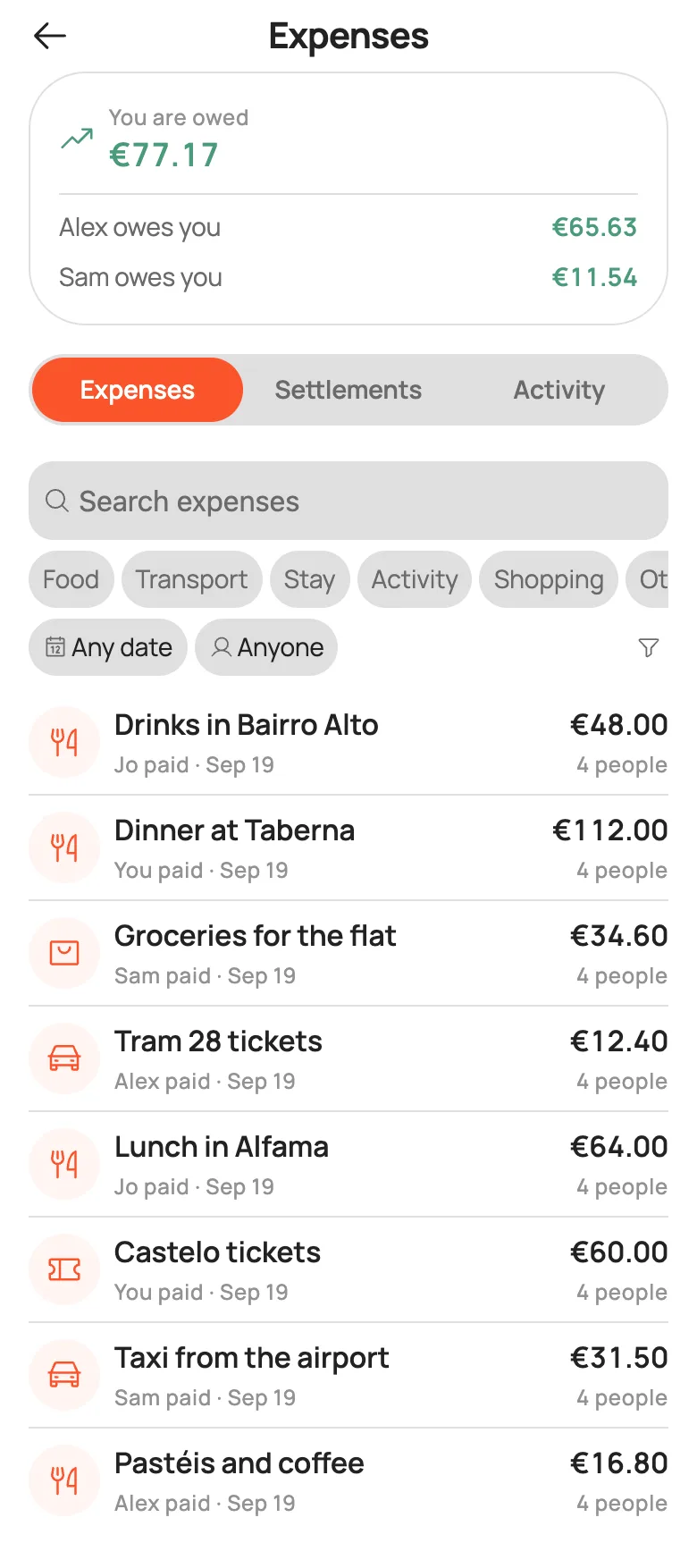
The organiser also has bookings, tasks, and questions arriving in the group chat. NomadCrew brings trip planning, chat, and shared expenses together. The app records who paid and who owes, in multiple currencies, with receipts; settlement happens in your own payment app.
NomadCrew doesn’t limit how many expenses you add in a day. Below, four friends have logged eight costs on the same day of a Lisbon trip.
Read the Splitwise comparison for travel and migration guide before deciding whether the app fits your crew. NomadCrew is available for iPhone, with Android on Google Play.
Product details checked against the linked official pages on 28 September 2026. Limits, plans, and availability can change.